What is AI data leak prevention
Data leak prevention, or DLP, is the set of controls that stop private data from leaving a company through channels it should not use. DLP for AI applies that idea to chat assistants, coding agents and scripts that call AI APIs. The goal: people keep using AI, and customer records, secrets and regulated data do not go out in the clear.
How AI traffic differs from email and file sharing
- It is typed and pasted, not attached. Classic DLP looks at documents and attachments. AI prompts are fragments from the clipboard.
- It is constant. A person may send dozens of prompts in an hour. A review queue cannot keep up.
- Agents gather context on their own. A coding agent opens files and reads command output without the user choosing each piece.
- The answer matters. With email, a blocked message is the end of it. With AI, the person is waiting for a result, and a stripped prompt can produce a useless one.
- There are many routes. Browser tabs, desktop apps, command line tools and scripts all reach AI providers in different ways.
Block vs redact vs seal
| Approach | What it does | Strength | Weakness |
|---|---|---|---|
| Block | Stops the request when private data is found, or blocks the AI tool entirely | Simple to explain and enforce | People lose the tool and may move to personal accounts and devices you cannot see |
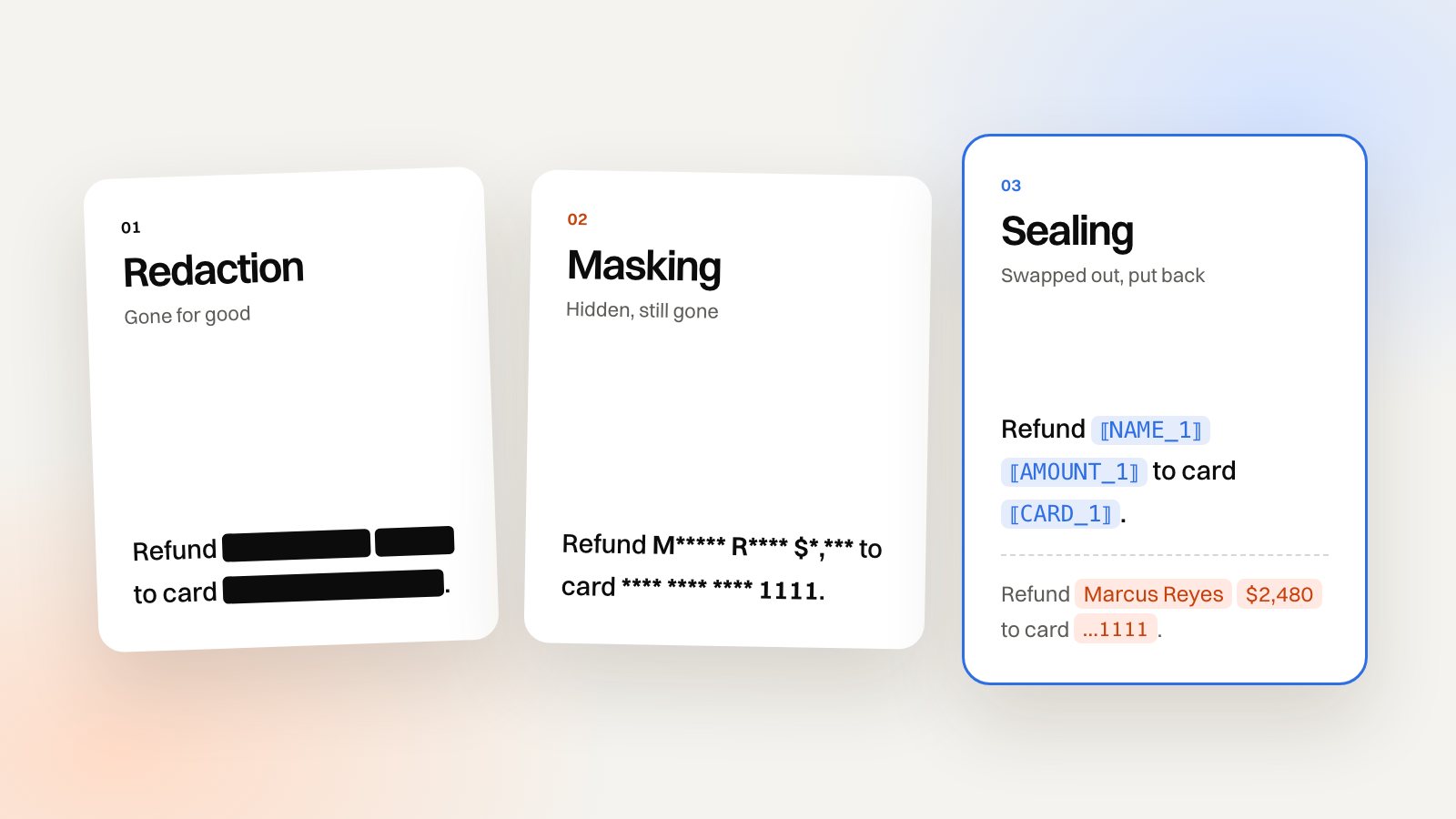
| Redact | Removes or masks the private data one way | The request still goes through | The AI loses context, and the answer comes back with gaps to fill by hand |
| Seal | Swaps private data for labelled placeholders, then puts the real values back into the answer locally | The AI can still follow who and what, and the answer is usable | Depends on detection quality, and the mapping must stay protected on the device |
These are not exclusive. A reasonable setup seals what it can read and blocks what it cannot.
What to ask an AI DLP vendor
- Where does detection run? On the device, in a browser extension, or in the vendor’s cloud. If prompts are inspected in a vendor’s cloud, that vendor is one more party holding your data.
- Which routes are covered? Browser chat, coding agents and API calls from scripts are three different problems.
- What happens when the check fails? Ask whether the request goes out anyway or is stopped.
- What about files it cannot read? Images, scans, audio and video need a stated rule.
- What is in the log? A log that stores the full prompt is a new copy of the private data.
- How is detection quality measured? Ask to test on your own files, not only the vendor’s samples.
- Do people have to change tools? Ask what a normal working day looks like with it switched on.
AI DLP evaluation checklist
- List the AI tools and routes you need to cover.
- Build a test set from your own files, with the kinds of private details you care about.
- Run the test set through the product. Count misses and false alarms by type.
- Test failure. Send a file it cannot read, break the check on purpose and see what goes out.
- Read the logs. Confirm you can show what was sent without the log holding the text.
- Pilot with a small team. See whether people leave it switched on.
- Check the cost per person and whether you must change AI plans.
No detection method catches everything, so the fourth step deserves the most time. How a product behaves when it is unsure tells you more than its best-case demo.
AI DLP and PCI DSS, GLBA and GDPR
PCI DSS is the card industry’s security standard for anyone who handles payment card data. GLBA is the US law that requires financial institutions to protect customer information. GDPR is the EU law that sets rules for handling the personal data of people in the EU. A DLP control can support the work these require, but no tool settles the question alone. This is not legal advice.
How ExtraTunnel approaches AI data leak prevention
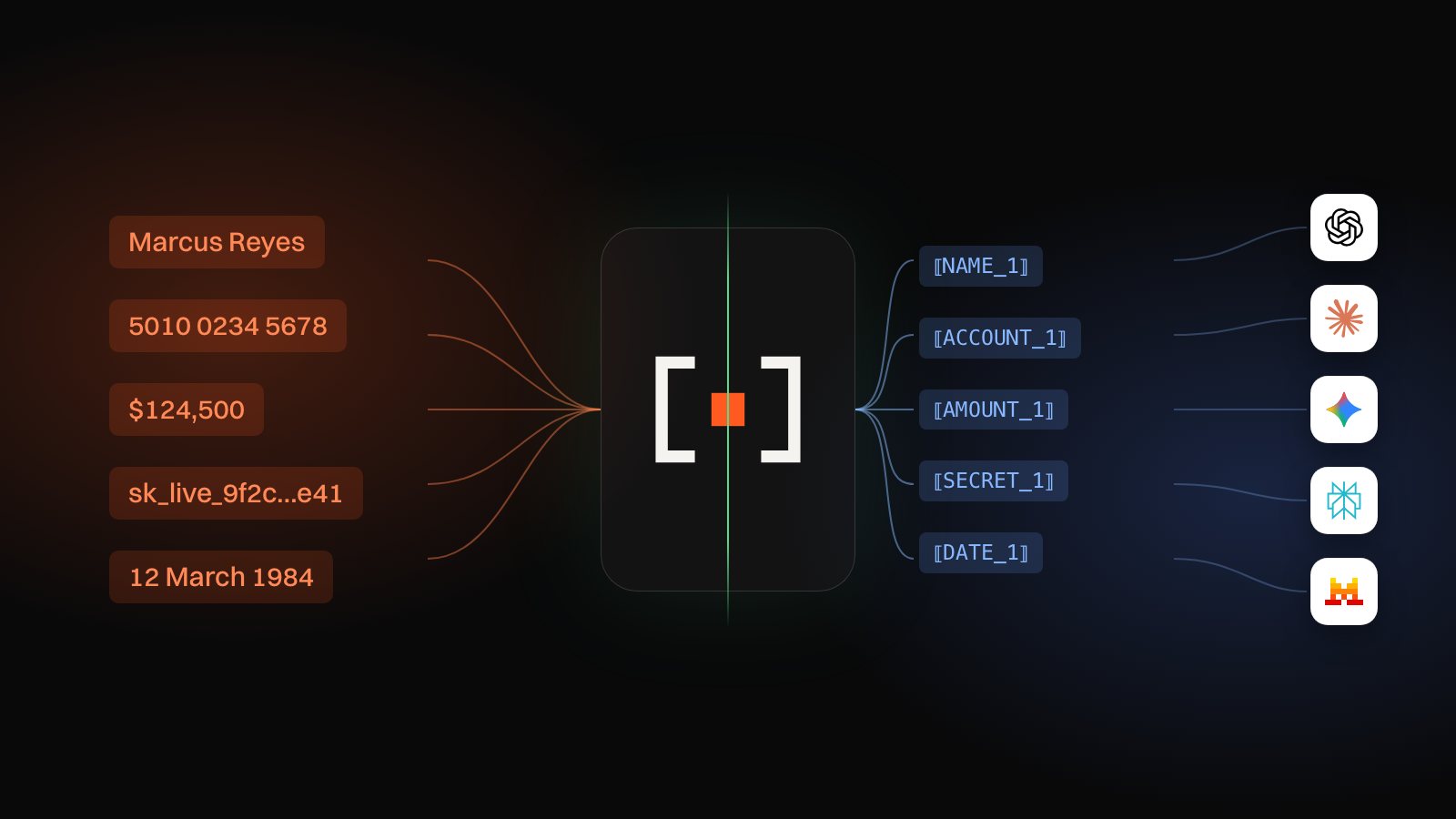
ExtraTunnel takes the seal approach. It runs on the person’s own computer and works like switching on a VPN: one switch, and people keep their own tools. That covers AI chat in the browser, coding agents and scripts that call AI APIs.
Before a request leaves, private details are swapped for labelled placeholders. The AI works on the sealed text, and the real values are put back into the answer on the computer. A second, simpler program checks every request before it leaves. If the check fails, the request does not go out. Every request gets a signed receipt that records counts and hashes, not the text. Files it cannot read are held on the device instead of being sent.
Teams keep the AI plan they already pay for. It is free for one person and $12 per person per month for teams, billed yearly. Enterprises start with a paid back-test on 500 of their own files. Details are on the security, pricing and enterprise pages.
Common questions
Can our existing DLP tool cover ChatGPT?
Some can inspect or block browser traffic to AI sites. Check whether yours handles pasted text, coding agents and API calls, and whether it can do anything other than block.
Should we just block AI tools?
Blocking is simple, but people who need the tools may move to personal accounts and devices you cannot see. Most teams do better with a control that lets the work continue.
What is the difference between redaction and sealing?
Redaction removes the data one way. Sealing replaces it with labelled placeholders and puts the real values back into the answer on the device, so the result is ready to use.
Does AI DLP slow people down?
It depends on where the check runs and how often it interrupts. Measure this in a pilot with real work before you roll it out.